

gaupretty
New Member
Mac version of Limera1n is now available for download. Even though the instructions for Mac are exactly the same as the one for Windows, I thought I would do the guide again for our Mac users who come here, searching for the Mac version of the instructions.

Simply follow the step by step instructions posted below to jailbreak your iPhone 4, iPad (on iOS 3.2.2) and iPod touch 4G / 3G running iOS 4.1.
NOTE for iPhone 4: If you rely on an unlock, do not update to iOS 4.1 yet as doing so will upgrade your baseband, making it impossible for now to unlock. Either use TinyUmbrella to update to iOS 4.1 without update baseband (instructions here), or wait for PwnageTool which will help you cook custom firmware files for iOS 4.1 without the upgraded baseband.
Step 1: Download Limera1n for Mac OS X from the link given below.
limera1n
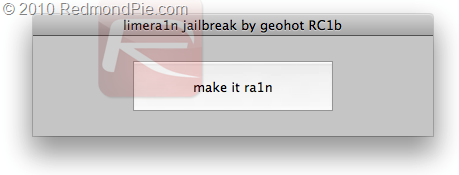
Step 2: Connect your via USB to your Mac and click on “make it ra1n” as seen in the screenshot below.
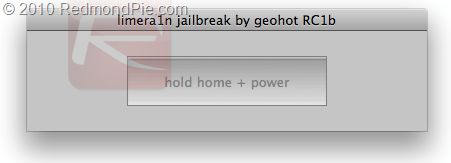
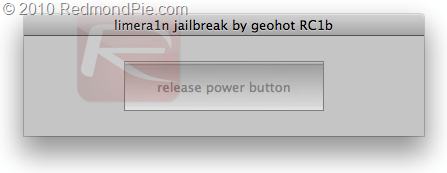
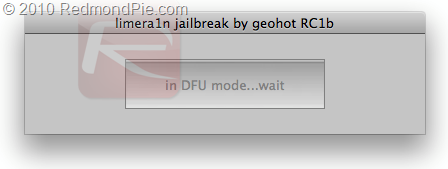
Step 3: Now follow the following steps in this order:
Step 4: Once you are done with this, you will have the limera1n logo on your iOS device screen. Limera1n will now inject the bootrom exploit to pwn your device forever!
Step 5: Jailbreak is done!
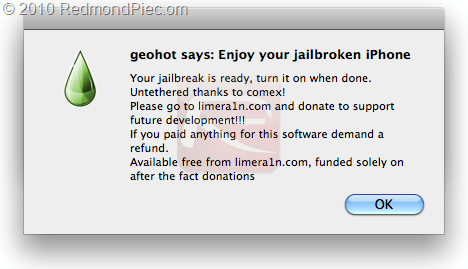
Step 6: Now start Limera1n app from your iPhone, iPad or iPod and install Cydia as shown in the screenshots below.

Step 7: Now simply restart your device and enjoy the jailbreak!
[video=youtube;wNYjMuW2tOs]http://www.youtube.com/watch?v=wNYjMuW2tOs[/video]
Simply follow the step by step instructions posted below to jailbreak your iPhone 4, iPad (on iOS 3.2.2) and iPod touch 4G / 3G running iOS 4.1.
NOTE for iPhone 4: If you rely on an unlock, do not update to iOS 4.1 yet as doing so will upgrade your baseband, making it impossible for now to unlock. Either use TinyUmbrella to update to iOS 4.1 without update baseband (instructions here), or wait for PwnageTool which will help you cook custom firmware files for iOS 4.1 without the upgraded baseband.
Step 1: Download Limera1n for Mac OS X from the link given below.
limera1n
Step 2: Connect your via USB to your Mac and click on “make it ra1n” as seen in the screenshot below.
Step 3: Now follow the following steps in this order:
- Now wait for the device to enter recovery mode:
- Now hold “Home” + “Power” buttons:
- Release the “Power” button:
- now wait for the device to enter DFU mode:
Step 4: Once you are done with this, you will have the limera1n logo on your iOS device screen. Limera1n will now inject the bootrom exploit to pwn your device forever!
Step 5: Jailbreak is done!
Step 6: Now start Limera1n app from your iPhone, iPad or iPod and install Cydia as shown in the screenshots below.
Step 7: Now simply restart your device and enjoy the jailbreak!
[video=youtube;wNYjMuW2tOs]http://www.youtube.com/watch?v=wNYjMuW2tOs[/video]
Nguon: redmondpie.com


