

Taki7610
Unlock_GSM
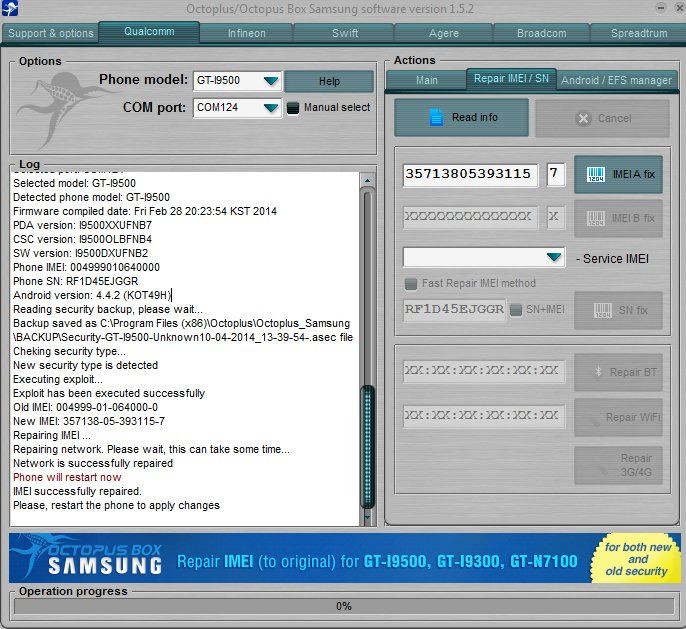
- Máy tình trạng Null, no baseband version 4.4.2, để nguyên repair Ok !

Mã:
Welcome to Octoplus/Octopus Box Samsung software version 1.5.2
-----------------------------------------------------------------------------------
To connect SGH-M919 phone you have to perform the following steps:
1. Disconnect USB cable from phone.
2. Go to Menu->Settings->More->About Device.
3.Tap on "Builds numbers" 7 times to enable developer options.
4. Go to Menu->Settings->More->Developer options.
5. Turn on "USB Debugging" option.
6. Go to dial window.
7. Enter "*#0808#" number.
8. Select "DM+Modem+ADB".
9. Close window.
10. Go to dial window.
11. Enter "*#9090#" number.
12. Set "Diag config" to "USB" value.
13. Restart phone.
14. Press "Read Info" in software.
-----------------------------------------------------------------------------------
To connect GT-I9500 phone you have to perform the following steps:
1. Disconnect USB cable from phone.
2. Go to Menu->Settings->More->About Device.
3.Tap on "Builds numbers" 7 times to enable developer options.
4. Go to Menu->Settings->More->Developer options.
5. Turn on "USB Debugging" option.
-----------------------------------------------------------------------------------
Platform: Samsung Android
Selected port: COM124
Selected model: GT-I9500
To put GT-I9500 phone into download mode you have to perform the following steps:
1. Reconnect phone battery.
2. Press and hold "Volume - "  + "Home" + "Power" buttons.
3. When phone turns on press "Volume+" button.
Repairing EFS...
Searching for a phone. Please wait...
Phone found.
EFS Repair successfully
-----------------------------------------------------------------------------------
Platform: Samsung Android
Selected port: COM124
Selected model: GT-I9500
Detected phone model: GT-I9500
Firmware compiled date: Fri Feb 28 20:23:54 KST 2014
PDA version: I9500XXUFNB7
CSC version: I9500OLBFNB4
SW version: I9500DXUFNB2
Phone IMEI: 004999010640000
Phone SN: RF1D45EJGGR
Android version: 4.4.2 (KOT49H)
Reading security backup, please wait...
Backup saved as C:\Program Files (x86)\Octoplus\Octoplus_Samsung\BACKUP\Security-GT-I9500-Unknown10-04-2014_13-39-54-.asec file
Cheking security type...
New security type is detected
Executing exploit...
Exploit has been executed successfully
Old IMEI: 004999-01-064000-0
New IMEI: 357138-05-393115-7
Repairing IMEI ...
Repairing network. Please wait, this can take some time...
Network is successfully repaired
Phone will restart now
IMEI successfully repaired.
Please, restart the phone to apply changes