

anhthai
New Member
Thông tin:
A more powerful & extremely-customizable full-screen web browser. Gives you 24% more screen real estate than Internet Explorer (in the portrait orientation)! Leverages the phone's fast, native browsing engine but with lots of additional features & tons of customization ranging from the frivolous to the very powerful.
NEW IN VERSION 2.5:
• Save pictures from web pages
• Reorder favorites
• Performance fixes & bug fixes
OTHER NEW FEATURES COMPARED TO VERSION 1.0:
• Easily tweet any page, complete with URL shortening
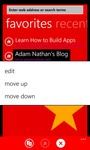
• Edit any favorite with a tap-and-hold
• Share a page with a text message
• Bug fixes
FEATURES:
• Full-screen browsing experience in both orientations & full functionality in both orientations
• Orientation lock enables you to force portrait or landscape browsing
• Unlimited number of tabs that are easy to manage
• Google-powered "lightweight mode" that optimizes desktop-designed pages for your phone
• Privacy mode that clears your recent/frequent/favorite sites & tabs when you're done
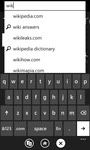
• Powerful auto-completion, powered by Google or Bing
• Search, powered by Google or Bing, integrated into the same box where you type URLs
• Integrated searching for apps in the Windows Phone Marketplace
• Supports running under the lock screen for a fast return from interruptions
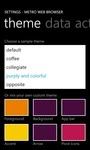
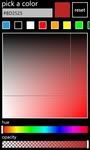
• Choose from built-in themes or design your own!
• Manage favorites, recent pages, and frequently-visited sites easily
• Customize the interaction between full-screen browsing and the "actions screen." Change the position and appearance of the actions button (a standard arrow vs. a page curl), or even shake your phone to swap modes!
The free trial has some features disabled, and places a few small ads in places that don't get in your way.
Learn how to build your very own Windows Phone apps with Adam Nathan's "101 Windows Phone 7 Apps" book!
Tham khảo: Metro Web Browser

