
Install the app
How to install the app on iOS
Follow along with the video below to see how to install our site as a web app on your home screen.
Note: This feature may not be available in some browsers.
-
Diễn đàn sẽ được nâng cấp và sáp nhập thành diễn đàn Xdo.vn nên diễn đàn sẽ dừng đăng ký thành viên mới. Toàn bộ diễn đàn sẽ được giữ nguyên vẹn tại tên miền phụ pdaviet.xdo.vn, danh sách thành viên và một số bài viết quan trọng sẽ được chuyển sang diễn đàn mới. Bạn có thể tham gia góp ý cho việc thay đổi diễn đàn ở đây. Cảm ơn bạn đã tiếp tục đồng hành cùng diễn đàn.
- Trang chủ
- Diễn đàn
- HỆ ĐIỀU HÀNH SYMBIAN OS
- SYMBIAN S60 3rd OS9.1
- S60v3 - ỨNG DỤNG
- S60v3 - ỨNG DỤNG CHUNG
You are using an out of date browser. It may not display this or other websites correctly.
You should upgrade or use an alternative browser.
You should upgrade or use an alternative browser.
TỔNG HỢP CẬP NHẬT CÁC ỨNG DỤNG!
- Thread starter Hungpdahl
- Ngày gửi
- Trạng thái
- Không mở trả lời sau này.


Kojiro
Super V.I.P
Mobisophy.Phone.Alone.v2.00.2200.S60v3.SymbianOS9.1.Unsigned
Ứng dụng nhiều chức năng: trả lời tự động, chuyển cuộc gọi, lấy dữ liệu danh bạ bằng tin nhắn, chống trộm...
Phiên bản tiếng Anh:
Mã:
[FONT=Arial] Phone Alone is an innovative remote control, anti-theft and data protection  solution. It helps you to access your phone when it is not available. Like set  up it as a auto answering & call forwarding machine, get back contacts,  protect private data on the phone, locate where is your phone or lock/unlock  your phone. Remotely!
[CENTER]
[URL="http://imageshack.us"][IMG]http://img291.imageshack.us/img291/6901/capture00076pw7.jpg[/IMG][/URL][/CENTER]

[/FONT][B][FONT=verdana][SIZE=2][COLOR=#ff0000]How to remote control your  phone?[/COLOR][/SIZE][/FONT][/B]

[LIST]
[*]By voice call: Call to your phone from one of your pre-set managing numbers.  Phone Alone will answer your call and prompt you with interactive voice menus.  Then you can press keys according to voice menus to control your phone.
[*]By silent text message (SMS): Send a text message only containing your  pee-set remote control code to your phone. Phone Alone will prompt you with  interactive text menus by SMS. Then you can reply text messages according to  instructions of text menus. SMS can be normal or silent and this setting is  configurable.
[/LIST]
   [B][FONT=verdana][SIZE=2][COLOR=#ff0000]What you can do in remote  control mode?[/COLOR][/SIZE][/FONT][/B]

[LIST]
[*]Set up your phone as an auto answering and call forwarding machine: You can  set your phone as an auto answering and call forwarding machine so you won''t  miss any calls. And also can assign the forwarded number or record the greeting  of answering machine remotely.
[*]Get back contacts: Get back contacts by interactive voice or SMS menus.  Matched contacts will be sent to you by text messages (SMS).
[*]Listen to local voicemails on your phone: You can call to your phone to  listen voicemails that generated by Phone Alone''s answering machine. Like  operator''s voicemail system.
[*]Protect or recover data: Protect or recover private data on your phone like  contacts, messages, images, videos and sounds remotely. Protected data can be  recovered later if you know the remote control code.
[*]Lock or unlock your phone to prevent from unwanted checks.
[*]Activate anti-theft mode: More details please see "How anti-theft function  works"
[/LIST]

[B]Notice: All these operations are also available for  local operations, not only limited to remote controls![/B]

  [B][FONT=verdana][SIZE=2][COLOR=#ff0000]How anti-theft function  works[/COLOR][/SIZE][/FONT][/B]
 Anti-theft mode will be triggered when your SIM card was changed. Once  anti-theft mode is activated, Phone Alone will call or send text messages to  three pre-set notification numbers so you can begin to remote control your lost  phone. If notification calls or text messages are not responded within certain  time (default is 5 minutes), all data will be protected  automatically.

[B]Notice: Whether to enable anti-theft feature is  configurable. And protected data can be recovered later if you know the remote  control code.

[CENTER][URL=http://imageshack.us][IMG]http://img122.imageshack.us/img122/2193/capturelw4.jpg[/IMG][/URL][/CENTER]
[/B] [FONT=Arial]
[/FONT]
Kojiro
Super V.I.P
Python : Battery Manager v1.0
Phần mềm quản lý pin chạy trên nền python. Bắt đầu sử dụng các bạn phải cài đặt mức pin thế nào thì PM sẽ báo (bằng âm nhé), sau khi đến mức pin đó, máy sẽ báo động và chuyển sang chế độ khác (nếu bạn cài đặt).
Cách cài đặt: cài xprofile_3rd_110_unsigned.SIS và blues_3rd_1_0_0_unsigned.SIS vào bộ nhớ máy, sau đó cài BatteryManager_v1_0_0_unsigned.sis vào bộ nhớ máy luôn. Python cũng trên máy nhé.
Quan trọng: chì dùng được khi nhấn CapsOff hay DisableCaps nha.


Zenki
Super V.I.P
FlipOfLife v0.4 beta
SCREENSHOTS:


TÍNH NĂNG:
8 kiểu flips khác nhau:
- FlipOfWay (Chọn đường để đi)
- FlipOfWisdom (Nghĩ tới 1 câu hỏi, flip và bạn sẽ biết phải làm gì!)
- FlipOfCoin (Flip và bạn sẽ biết được mặt của đồng xu)
- FlipOfJoker (Flip và bạn sẽ học thêm đc ý nghĩa của cuộc sống)
- FlipOfSex (Nghĩ tới kích cỡ của bạn flip và bạn sẽ nhận đc cái xứng đáng)
- FlipOfStarWars (Xem ở phe nào bạn sẽ mạnh hơn)
- FlipOfSF (Chỉ nhìn^^)
- FlipOfTwoFace (Sometimes it feels go 2 bad, sometimes won't)
Shortcuts của từng Flip!
CÁCH CÀI ĐẶT
Python v1.44 và MegaPyModulePack V1.52 phải được cài trong C:\!
DOWNLOAD
** FlipOfLife v0.4 beta **
SCREENSHOTS:
TÍNH NĂNG:
8 kiểu flips khác nhau:
- FlipOfWay (Chọn đường để đi)
- FlipOfWisdom (Nghĩ tới 1 câu hỏi, flip và bạn sẽ biết phải làm gì!)
- FlipOfCoin (Flip và bạn sẽ biết được mặt của đồng xu)
- FlipOfJoker (Flip và bạn sẽ học thêm đc ý nghĩa của cuộc sống)
- FlipOfSex (Nghĩ tới kích cỡ của bạn flip và bạn sẽ nhận đc cái xứng đáng)
- FlipOfStarWars (Xem ở phe nào bạn sẽ mạnh hơn)
- FlipOfSF (Chỉ nhìn^^)
- FlipOfTwoFace (Sometimes it feels go 2 bad, sometimes won't)
Shortcuts của từng Flip!
CÁCH CÀI ĐẶT
Python v1.44 và MegaPyModulePack V1.52 phải được cài trong C:\!
DOWNLOAD
** FlipOfLife v0.4 beta **

TraiNgheoHn
New Member
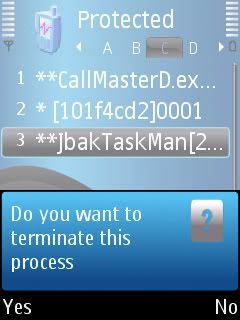
Jbak TaskMan v0.99 RC3 [UpdatE 01 Nov'08]
Ứng dụng quản lý các chuơng trình đang làm việc trên mobile. Bản cập nhật
Ứng dụng quản lý các chuơng trình đang làm việc trên mobile. Bản cập nhật
TraiNgheoHn
New Member
Bluehoo v1.0.1 Beta - Make new social connections with people around you!
Bluehoot là 1 ứng dụng của ĐT giúp máy kết nối cộng đồng để kinh doanh hoặc những cái khác.
bluetot sử dụng công nghệ blute để phát hiện ra "hoó" xung quanh ban,và chỉ cho bạn những thông tin của mọi người và giúp đỡ bạn bắt đầu hội thoại.
Bluehoot là 1 ứng dụng của ĐT giúp máy kết nối cộng đồng để kinh doanh hoặc những cái khác.
bluetot sử dụng công nghệ blute để phát hiện ra "hoó" xung quanh ban,và chỉ cho bạn những thông tin của mọi người và giúp đỡ bạn bắt đầu hội thoại.


Kojiro
Super V.I.P
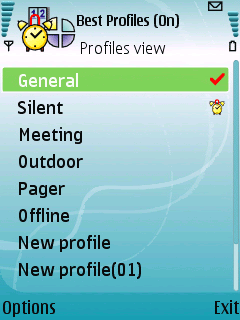
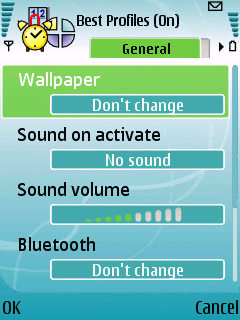
Smartphoneware Best Menu v1.0 S60v3 SymbianOS9 Unsigned
Ứng dụng quản lý Menu 1 cách nhanh chóng: dạng như SmartSetting.
Mã:
[FONT=Arial]Best Menu - all about improving your phone as a Smart Phone.  Organise and instantly access phone numbers, contacts, emails, documents. Insert  predefined text templates into any application, create and execute macros that  can automate a long list of actions you need to do to accomplish one task, Type  & Go functionality, integrated call log and many more other functions to  explore.

[URL="http://imageshack.us"][IMG]http://img444.imageshack.us/img444/9024/capture00003yb0.jpg[/IMG][/URL]
[URL="http://g.imageshack.us/img444/capture00003yb0.jpg/1/"][IMG]http://img444.imageshack.us/img444/capture00003yb0.jpg/1/w240.png[/IMG][/URL]

How to start

 Best Menu consists of two main modules: a Configuration application  and a Service module.
[B]When you activate the service you can access its functionality  anytime in any application by pressing and holding [YES] key (also called as  green key, dial key) for more than 1 sec.

If you make normal press of  [YES] key the default action will be performed (e.g. accept call, dial some  number from some application, etc). If [YES] is pressed and holded for more than  1 second the Best Menu service will pop up. [/B]
 When the Best Menu service is activated there is no need to keep the  configuration application opened. You can close it not to waste your device  memory.

How it works

[URL="http://imageshack.us"][IMG]http://img125.imageshack.us/img125/3379/bmenuscr001kz5.gif[/IMG][/URL]

[IMG]http://www.ipmart-forum.com/res/menu60_3/b_menu_scr_001.gif[/IMG]  The service does not substitute your phone Menu application or  standby screen application, it works with them providing additional functions  set and increasing your device usability.

In the service main view you  can see Tabs set on the left and a list of items on the right. You can switch  between them using left/right keys. You create any amount of tabs and place any  number of items on each tab. This allows you to categorise your items and be  able to access the needed item as fast as possible.

you can place as an  item:
[/FONT]
[LIST]
[*][FONT=Arial]Phone numbers[/FONT]
[*][FONT=Arial]Contacts[/FONT]
[*][FONT=Arial]Applications[/FONT]
[*][FONT=Arial]Macros[/FONT]
[*][FONT=Arial]Notes[/FONT]
[*][FONT=Arial]Email addresses[/FONT]
[*][FONT=Arial]Web links[/FONT]
[/LIST]
[FONT=Arial] Text templates and macros
 Text template is the simplest macro. To create it use "Place new" \  "Macro" command. As a macro text you can type any text. For example "Hello  world!" or "Best regards, Antony Djin". When you execute the macro this text  will be simply typed into your currently opened application.

[B]Moving  further. Auto text.[/B]

Sometimes you need to insert a bit more complex  text that includes, say, current date or time, person name of last call or his  number, etc. You can use macro words to make it. To insert macro word to current  macro text you can use "Insert" command and select the needed action.

Example of simple auto text macro:
Created: <date>
Hello <lastcall>,
...
Best regards,
Antony Djin
[B]Moving further. Scripting.[/B]

Macro is like a shortcut -  it is something that can automate a long list of actions you need to do to  accomplish one task. It rolls many steps into one. Basically you define every  keystroke, every button click, every command that you need to do in order to  accomplish this one task, so when you need to do this possibly complex set of  actions next time, the macro will just repeat back everything it observed.

Best Menu macros allow you to start/stop defined aplication(s), send  keys to these applications, opening menus, selecting needed commands in menus,  prefill forms, etc

You don't need to remember all macro words to make  macro. You can just insert them from menu "Insert" when editing macro.
[/FONT][FONT=Arial]
[/FONT][URL="http://www.ipmart-forum.com/res/menu60_3/macro.htm"]> Here is the full list of  macro words you can use...[/URL]
[CODE]http://www.smartphoneware.com/res/menu60_3/macro.htm
Type & Go and Call log tabs


"Type & go" - here you can type something, any part of someone's number or name, or part of application name and service will find all contacts or applications that match your text. With 'type and go' you find and start some application fast or find some number or contact and call it, etc
"Call log" - here you can overview your phone conversations. All calls in one view with caller information, date and duration.
If you don't want these tabs to be displayed you can hide them using "Edit tabs" commands
Modify and organise tabs
You can use "Edit tabs" command to modify existing tabs names, icons, create new tabs and change their order. Also you can hide or delete not needed tabs and make one tab default if you want. Default tab will always be selected when you pop up the service window. If no default tab is selected then the last used tab will stay selected when you pop up the service.
[/CODE]

TraiNgheoHn
New Member
Zensis PhotoRite SP v6.1.3 S60v3 N95 Retail-rGPDA
Pm chỉnh sửa ảnh trên mobile
Link down: http://rs525.rapidshare.com/files/160157922/Zensis.PhotoRite.SP.v6.1.3.S60v3.N95.Retail-rGPDA.rar
Hoặc: http://www.zshare.net/download/50876914e91c85ab/
Pm chỉnh sửa ảnh trên mobile
Link down: http://rs525.rapidshare.com/files/160157922/Zensis.PhotoRite.SP.v6.1.3.S60v3.N95.Retail-rGPDA.rar
Hoặc: http://www.zshare.net/download/50876914e91c85ab/
Sửa lần cuối:


Kojiro
Super V.I.P
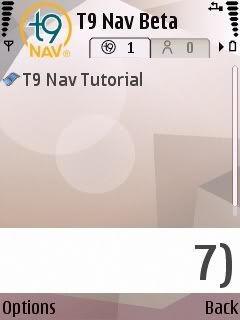
Nuance T9 Nav v1.0 S60v3 SymbianOS9.1 Unsigned
Ứng dụng hỗ trợ tìm kiếm trên phone mạnh mẽ. Bản cập nhật.
Ví dụ: Cho chạy ứng dụng chạy ngầm, khi bạn nhấn số 7, ứng dụng sẽ tìm tất cả các thành phần trong phone bạn bắt đầu từ: số 7, bắt đầu từ chữ P, Q, R, S (các chữ trong số 7 khi soạn thảo)

Kojiro
Super V.I.P
Kedar Chitale Time Machine v1.8.1.S60v3 SymbianOS9.x
Ứng dụng đồng hồ nhiều chức năng: theo dõi giờ, bấm giờ, hẹn giờ...
Phím tắt:
Menu - (1) - Clock, (2) - Alarm, (3) - Stop Watch, (4) - Timer
Clock - (Selection Pad) - Settings, (C) - Delete
Alarm - (Selection Pad) - Settings, (C) - Delete
Stopwatch - (Selection Pad) - Settings, (1) - Start, (2) - Lap, (3) - Stop, (C) - Delete
Timer - (Selection Pad) - Settings, (1) - Start, (3) - Stop, (C) - Delete


TraiNgheoHn
New Member
JbakTaskMan9 v1.00 R1 TestBrowser/R1 var1/R1 var2
Ứng dụng quen thuộc
Ứng dụng quen thuộc
- Trạng thái
- Không mở trả lời sau này.